In today’s digital world, protecting personal data and user security are becoming increasingly important. Every day, people face threats related to information leaks and surveillance by internet services, as well as regulations imposed by various organizations. As a result, the question of ways to enhance security and optimize internet performance is increasingly being raised. Proxies are a key method for improving network connectivity and managing internet traffic.
A proxy acts as an intermediary between the user and the internet, redirecting traffic through itself. However, their capabilities are not limited to this. Proxies can speed up page loading through caching, provide traffic control on corporate and educational networks, and filter unwanted content.
Today, we’ll explore what proxy servers are, the different types, their advantages, and the most common use cases. We’ll also cover the basic principles of setting them up to help you choose the right option for your needs.
What is a proxy server and why use it?

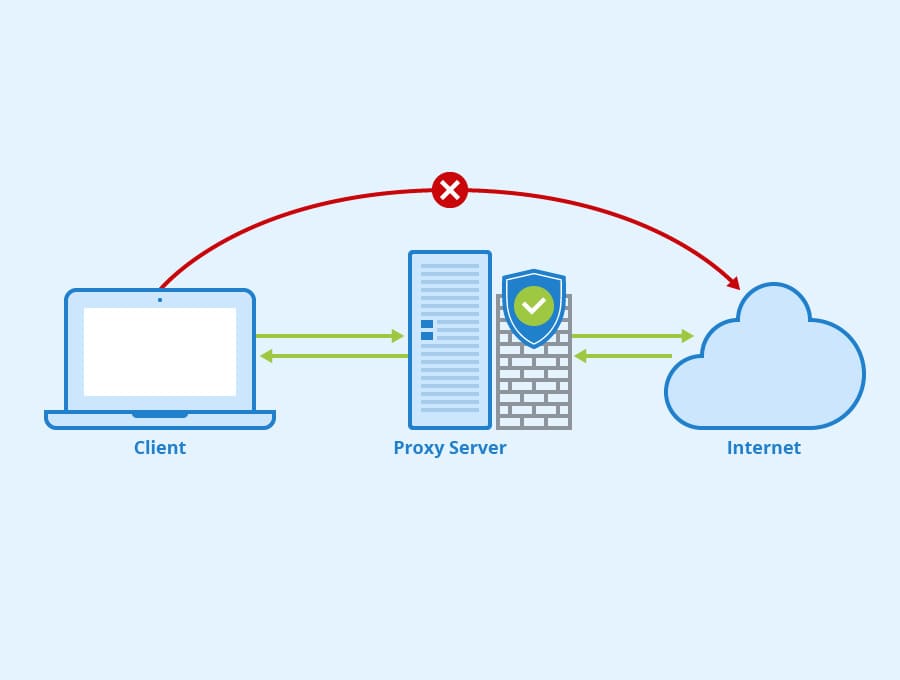
Изображение: wiki.merionet.ru
A proxy server acts as a kind of curtain between the user and the network. A proxy not only provides an additional layer of privacy by preventing the collection of detailed location and activity data, but also optimizes network performance.
By using buffering, information is stored for later retrieval, significantly speeding up the loading of Internet resources and reducing the load on the main connection.
A proxy masks your IP address, providing some degree of anonymity from attackers and protecting your data from being tracked.
It allows you to block spam, making it a useful tool for access control in offices and educational institutions.
Additionally, the proxy filters content, blocking ads and malicious sites, which reduces the risk of virus infection and makes internet surfing safer.
In marketing, proxies are widely used for competitor analysis and user data collection, allowing companies to fine-tune targeting and improve the effectiveness of advertising campaigns.
The proxy functionality also includes data routing optimization, allowing traffic to be redirected along alternative routes when the main channel is overloaded.
How does a proxy work?
The proxy operating principle is based on the step-by-step processing of requests: during a request to a web resource, incoming data is first transmitted through the proxy, where the IP address is replaced with a new one, after which the modified traffic is forwarded to the final resource.
Thanks to their flexibility and versatility, proxies play a vital role in both personal and corporate environments, especially for companies focused on improving network speed and security in a dynamic cyber environment. Their ability to combine filtering, caching, and traffic management makes them a versatile network tool.
VDS и VPS
Flexible virtual servers with hourly
billing worldwide: Russia, Asia, and Europe. Create an account
How do proxies protect against DDoS attacks?
Network proxies are a key defense against DDoS attacks, which aim to overload infrastructure and network nodes with an excessive flow of requests, causing service disruptions. Masking the host’s true IP address is considered a key method for preventing attacks, as attackers communicate with the proxy rather than the company’s actual servers, eliminating the possibility of a direct attack on the system.
Additionally, proxies can filter malicious traffic by analyzing incoming requests and blocking suspicious activity using IP blocking, rate limiting, and behavioral analysis to identify bots and scripts.
Load balancing, implemented through proxy services such as Qrator or Nginx, distributes incoming traffic across multiple servers, reducing the risk of overload. Caching reduces the load on the primary server by storing frequently accessed data and preventing multiple requests to the same resources.
Proxies also analyze automated requests and block bots based on indicators such as missing JavaScript, suspicious user behavior, or non-standard HTTP request headers. Geo-blocking allows you to restrict traffic from specific regions if an attack originates from specific countries or IP address ranges.
Using SOCKS5 proxies, which support both TCP and UDP data transfer, is particularly useful for protecting gaming services and VoIP platforms from attacks. Reverse proxies provide protection against DDoS attacks by accepting all incoming traffic, analyzing and blocking threats, preventing it from reaching the end host. Load balancers redistribute connections between servers, preventing excessive load on a particular node. These proxies help anonymize IP addresses, filter network traffic, evenly distribute the load, and effectively counter botnet attacks, significantly improving service stability during DDoS attacks.
Proxy protocols and types
Proxy servers can be divided into two broad groups: by the protocols they use and by their functionality. The classification by protocol is presented below:
- HTTP proxy
HTTP proxy servers specialize in processing requests based on the HTTP protocol, which is the primary protocol for transmitting web pages. Their main advantage is the ability to cache information. When re-accessing previously downloaded resources, the server can quickly provide a copy of the previously stored content, significantly reducing page load times. This type of proxy is ideal for applications where access speed and bandwidth savings are a priority, especially in cases where additional data encryption is not required.
- HTTPS proxy
HTTPS proxies perform the same functions as HTTP proxies but also employ encryption to protect transmitted information. This is critical when handling sensitive information, such as online transactions or personal data. Encryption enhances security, making the connection between the client and server more resilient to potential threats. However, it should be noted that the use of cryptographic algorithms requires additional computing resources, which may slightly slow down request processing.
- SOCKS proxy
SOCKS proxies are highly versatile, supporting not only web traffic but also other types of data, such as FTP, P2P networks, and online gaming applications. This approach makes them a versatile tool for transferring a wide variety of data. However, SOCKS proxies lack a built-in caching mechanism, which can impact access speeds to frequently accessed resources. Furthermore, configuring them often requires a deeper understanding of network principles compared to HTTP or HTTPS proxies.
In addition to the differences in the protocols used, proxy servers can be classified according to their functional purpose :
- Anonymous proxies
Private proxies are designed to improve connection privacy by masking the client’s network address. This helps reduce the direct connection between the user and the requested data, which can be useful for corporate structures or educational institutions seeking additional security for their internal networks. The primary purpose of anonymous proxy servers is to make it difficult to identify the requestor, thereby improving data security during transmission.
- Transparent proxies
Transparent proxy servers, on the other hand, do not hide the client’s IP address. They transmit raw information, allowing network administrators to conduct detailed monitoring and analysis of user activity. This approach is in demand in environments where strict control over network resource usage is required—for example, in corporate or educational environments where transparency of interactions and compliance with established rules are essential. Transparent proxies help organize centralized traffic management and ensure reliable network administration.
Proxy servers: pros and cons
Here we’ll look at the pros, cons, and features of each proxy type and type, and provide recommendations for choosing the best option.
| Proxy type | Peculiarities | Pros | Cons |
| HTTP proxy | Works with HTTP; caches pages | Easy to set up, speeds up loading | No encryption |
| HTTPS proxy | Works with HTTPS; encrypts data | Protects data, suitable for confidential work | Requires more resources for encryption |
| SOCKS proxy | Universal; supports different protocols | Flexible, works with any traffic | No caching, more difficult to set up |
Based on the data listed in the table, we can conclude that:
- An HTTP proxy is suitable for regular internet surfing and storing pages in the cache, but it does not guarantee reliable information protection.
- An HTTPS proxy is recommended for use when handling sensitive data, as it encrypts the information being transmitted.
- SOCKS proxy is optimal for non-standard applications and various protocols, but requires more complex configuration.
| Proxy type | Peculiarities | Pros | Cons | Recommendations |
| Anonymous | Hide your real IP | Increased privacy | It is possible to determine the fact of using a proxy | To protect privacy |
| Transparent | They transmit the original IP | Allows you to monitor traffic | They don’t hide their IP address. | For corporate control and monitoring |
- Anonymous proxies are suitable for users who value online privacy.
- Transparent proxies are useful in corporate environments where control and monitoring of employees’ internet traffic is required.
How to set up a proxy server?
We’ll cover installing and configuring a proxy server on Ubuntu 22.04 using Squid. Depending on your needs, your configuration may vary: you can configure the proxy server globally for the OS or individually for each browser.
Preparing for installation
- Download the script:
wget https://raw.githubusercontent.com/korolev065/Squid-proxy/refs/heads/main/proxy.sh -O proxy.sh
- Make the file executable:
chmod +x proxy.sh
- Run the script:
sh proxy.sh
Installation process
The script automatically performs the following actions:
- updates the package list;
- installs Squid and
apache2-utils; - stops the Squid service;
- generates random login/password and port;
- creates a file with credentials via
htpasswd; - creates and moves the Squid configuration to
/etc/squid/squid.conf(specifies the port, enables basic authentication usingbasic_ncsa_auth, configures ACLs to allow access only to authorized users, and describes caching options); - initializes and verifies the cache;
- starts Squid;
- adds Squid to startup;
- opens the generated port in the UFW firewall.
Main commands used:
apt update, apt install squid apache2-utils— installation of necessary packages;systemctl stop squid, systemctl start squid, systemctl enable squid— Squid service management;openssl rand -base64, openssl rand -hex— generating a password and username;shuf -i 2000-60000 -n 1— random port selection;htpasswd -b -c /etc/squid/passwd ...— creation of a credentials file;squid -z, squid -k parse— initialization and configuration verification;ufw allow "порт"— allowing incoming connections to the selected port.
The software used and the result
This installation used Squid Proxy Server, a high-performance proxy server for HTTP, HTTPS, FTP, and other protocols.
Key features of Squid:
- Caching reduces the load on the channel and speeds up access to frequently requested resources.
- Access control – allows you to configure access rules by IP, time, URL, and other parameters.
- Anonymization ensures confidentiality.
- Content filtering is the ability to block unwanted content.
- SSL/HTTPS support – works with secure connections.
Basic parameters of the installed proxy (obtained after successfully running the script):
- Type : HTTP proxy with authorization
- IP : automatically detected by the script, will be displayed in the output
- Port : 24686
- Login : user06033882
- Password : hNI1MU3i17VIP3TU
All commands were executed automatically via a bash script, eliminating the need to manually enter commands or edit configuration files. Squid is one of the most popular and reliable proxy servers in the Linux world, making it an ideal choice for creating a proxy server on Ubuntu 20.24.
The installation result is shown in the screenshot:

How to set up a proxy server on a PC?
Below we will look at adding the proxy server we installed earlier to Windows 11 using the proxy.sh.
- Open the Start menu. In the list that appears, find “Settings,” then go to “Network & Internet” and select “Proxy Server.”

- In the “Manual Proxy Configuration” section, enable the “Use a proxy server” option. Then, enter the proxy network address and port. If necessary, configure an exception list for addresses for which the proxy is not used.

- Click Save.
Conclusion
Proxy servers are more than just a security tool or a way to speed up website loading; they are a powerful mechanism for managing traffic, protecting data, and filtering unwanted content. Their relevance is growing amid increasing information security threats and the need to monitor internet activity.
Main areas of application: privacy protection, corporate access control, and marketing analytics. HTTP proxies are suitable for basic web surfing, HTTPS for secure data transfer, and SOCKS for working with various protocols. Anonymous proxies hide IP addresses, while transparent proxies are used for traffic monitoring.
Proxy setup can be as simple as using ready-made solutions, or as complex as deploying your own server with authentication, caching, and filtering. Choosing the optimal proxy depends on your priorities—whether it’s speed, security, or traffic control.